 Keet Support
Speaking While Muted 🎙️
On Keet desktop, a reminder appears next to the microphone button when you keep talking during a call with your microphone muted.
What is the "You're muted" reminder?
If you start talking during a call while your microphone is muted, Keet shows a small reminder above the microphone button:
You're muted. Click to unmute yourself so that they can hear you.
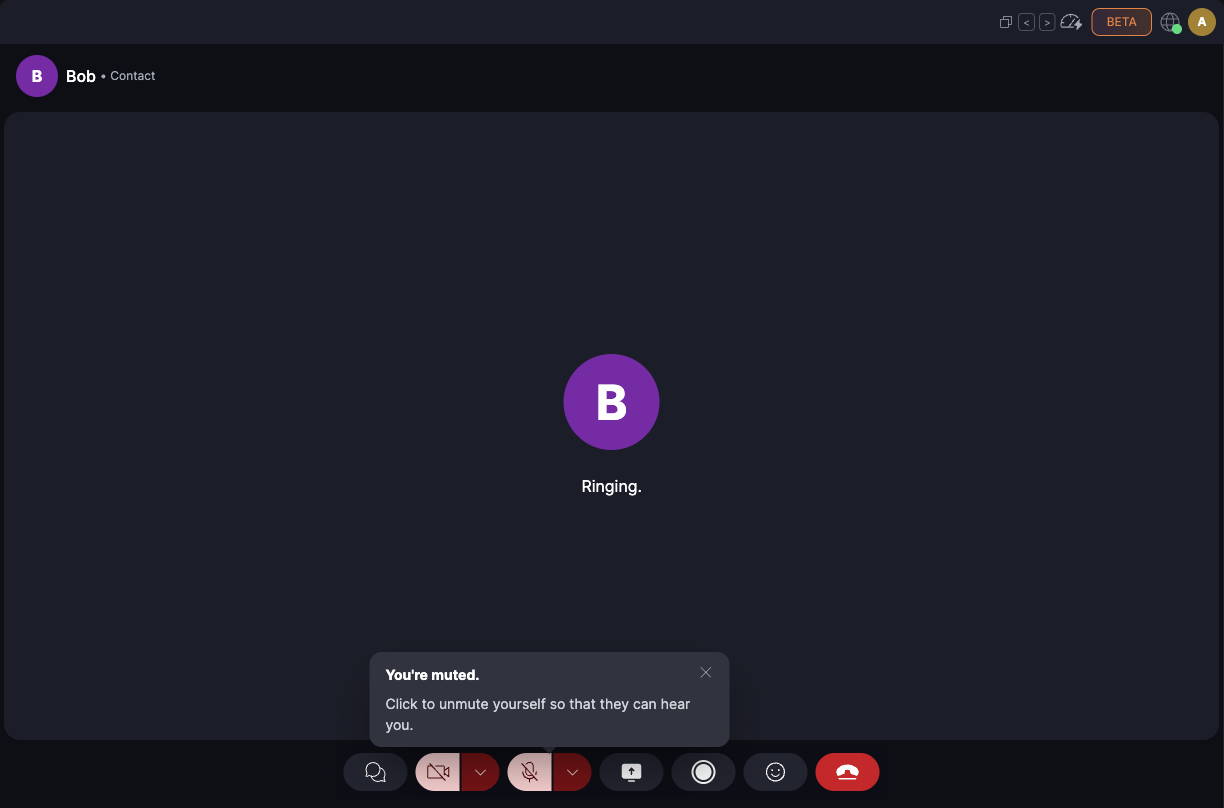
The reminder works in direct calls and in group calls.
The reminder is available on Keet desktop. It isn't part of the mobile app in this release.
When does it appear?
Keet shows the reminder when it hears you talking for about two seconds in a row while you're muted. Short pauses between words don't reset the count, but a brief sound, like a click, isn't long enough to trigger it.
You never see the reminder while your microphone is on.
How do I dismiss it?
The reminder goes away when you:
- Unmute your microphone. Select the microphone button, or use the shortcut shown when you hover over it.
- Select the close button ('Hide this message'), select anywhere outside the reminder, or press Esc.
- Stop talking. It closes on its own about a minute after you go quiet.
After you dismiss it, Keet doesn't show it again until you unmute and mute yourself again.
Who can see it, and is my audio recorded?
- Only you see the reminder. Other people in the call can't see it.
- Keet checks on your device. It listens to your microphone locally to tell when you're talking. While you're muted, nothing is sent to the call, recorded, or stored.
I don't see the reminder
- Check that Keet has microphone access and that the right microphone is selected in the call. If Keet can't use your microphone, it can't tell when you're talking, and the call continues normally.
- The reminder doesn't appear while another Keet message about microphone access is open. Close that message first.
- If you're having trouble with sound during calls, see Sound issues.